Configuring the ODBC Driver
You must change the connection settings from the Windows ODBC administrator.
Note
In JDBC and ODBC driver configurations, https://api.qubole.com is the default endpoint.
Prerequisites
Ensure that you have the access to the object/resource that you refer to in the driver configuration. If you see an access denied error, check with the Qubole account administrator. For more information, see Resources, Actions, and What they Mean.
Perform these steps from the Windows Control Panel:
Navigate to the ODBC administrator from the Windows Control Panel (the path varies depending on the Windows version, as described in Verifying the Driver Version.
Go to System DSN, select Qubole ODBC Driver DSN 64 and click Configure. The Qubole ODBC Driver DSN Setup dialog box is displayed. (The version number is the latest driver version)
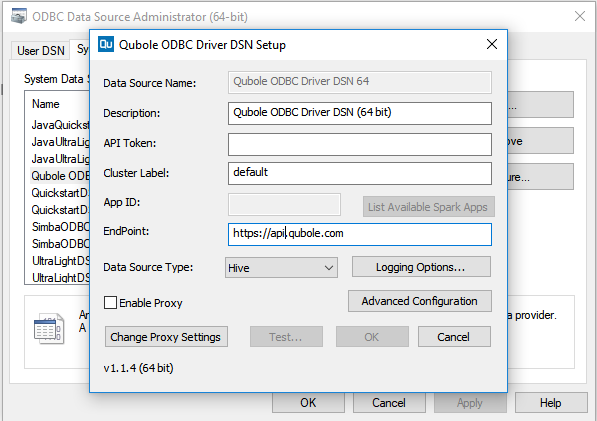
Enter API Token, Cluster Label, Endpoint and choose the appropriate DSN name. (These are mandatory parameters and App ID is mandatory for Spark.) Managing Your Accounts provides more information on the API tokens.
Click OK.