Enabling the Proxy Connection
You can enable proxy if you want to use a proxy server for your connections on Qubole ODBC Driver DSN Setup. To enable:
Select the Enable Proxy checkbox. The Proxy Server Configuration dialog box is displayed.
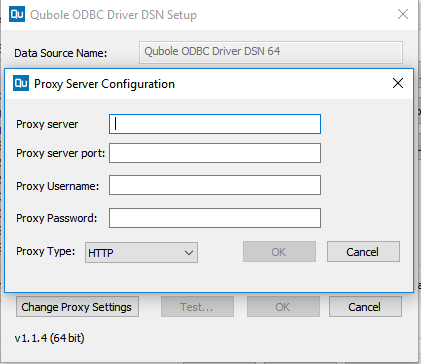
Enter the Proxy server address and Port, which are mandatory. Example:
Server: 192.168.56.1andPort: 808.Enter a Proxy Username and Password if authentication is required.
Choose a different Proxy Type if you do not want the default HTTP. These are the other supported proxy types:
- HTTP_1_0
- SOCKS4
- SOCKS4A
- SOCKS5
- SOCKS5_HOSTNAME