Setting Additional Configuration
The advanced driver configuration and the configuration to create and list the Spark Apps are described in the following section.
To set the advanced configuration, perform these steps:
On Qubole ODBC Driver DSN Setup, click Advanced Configuration. The following dialog is displayed.
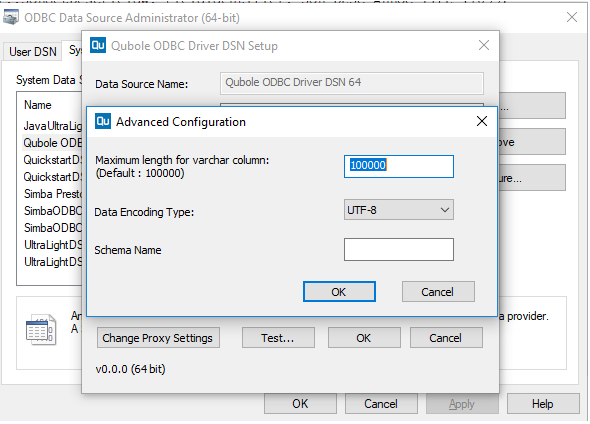
You can change the following properties under Advanced Configuration:
Maximum length of varchar column: If you do not want to use the default value, which is 100000.
However, some tools require the maximum value to be set below a particular limit.
Example: For Microsoft SQL Server, this value has to be set to 8000 or less than 8000.
Data Encoding type: You can choose the encoding type of the data as
UTF-8orWindows-1252. The default type isUTF-8.Schema Name: Enter the schema name to filter to that schema while fetching metadata so that only the related
TABL_SCHEMconfigured is exposed.
Listing and Creating Spark Apps
You can get the list of Spark Apps available with the entered API token and endpoint.
On Qubole ODBC Driver DSN Setup, choose Spark as Data Source Type. Ensure that the correct API token and endpoint have been entered. Click List Available Spark Apps. The Spark Apps dialog box is displayed.
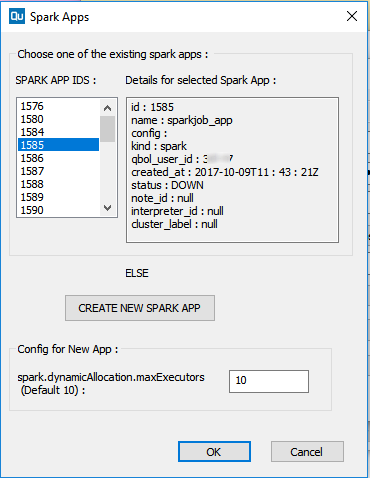
Select one of the listed apps represented by the App ID or click CREATE NEW SPARK APP to create a new spark app.
For the new app, you can change the configuration value of
spark.dynamicAllocation.maxExecutors. Its default value is 10.