Enabling the Proxy Connection
You can enable proxy if you want to use a proxy server for your connections on Qubole ODBC Driver DSN Setup. To enable:
Open iODBC Administrator64 with Administrator Privileges. (
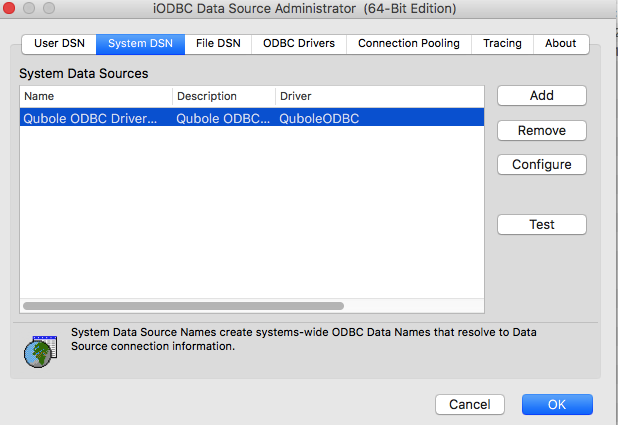
sudo /Applications/iODBC/iODBC\ Administrator64.app/Contents/MacOS/iODBC\ Administrator64)Go to System DSN and select Qubole ODBC Driver DSN.
Click Configure and the dialog is illustrated here.
Enter the valid API Token.
Change the DSI to the required one - (Hive, Presto or Spark).
Create a keyword entry by clicking the + button. Enter
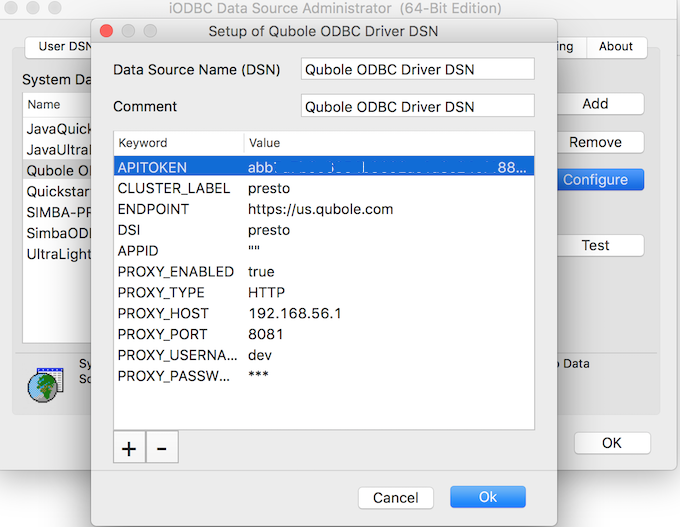
PROXY_ENABLED = true.Note
The keywords associated with the proxy connection are
PROXY_HOST,PROXY_PORT,PROXY_USERNAME,PROXY_PASSWORD,PROXY_ENABLED, andPROXY_TYPE.Similarly, set the
PROXY_HOSTandPROXY_PORTkeyword values, which are mandatory. Example:PROXY_HOST = 192.168.56.1andPROXY_PORT = 8081.Enter a value each for the
PROXY_USERNAMEandPROXY_PASSWORD(after adding them as keywords) if authentication is required.Add the
PROXY_TYPEkeyword and add a different value if you do not want the defaultHTTPvalue. These are the other supported proxy types:HTTP_1_0SOCKS4SOCKS4ASOCKS5SOCKS5_HOSTNAME
Here is an example of the DSN Setup with the Proxy connection enabled.