Setting Additional Configuration
The advanced driver configuration are described in the following section.
To set the advanced configuration, perform these steps:
Open iODBC Administrator64 with Administrator Privileges. (
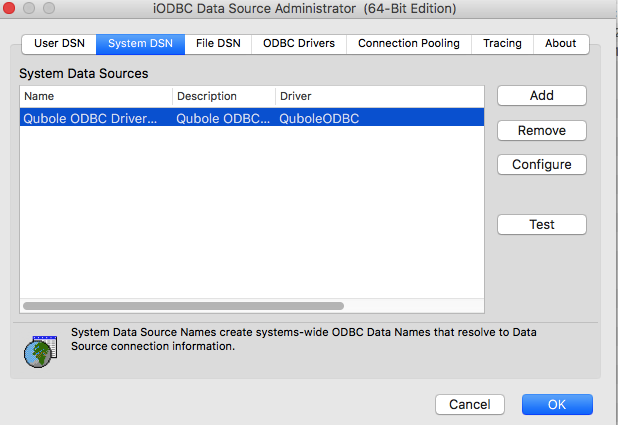
sudo /Applications/iODBC/iODBC\ Administrator64.app/Contents/MacOS/iODBC\ Administrator64)Go to System DSN and select Qubole ODBC Driver DSN.
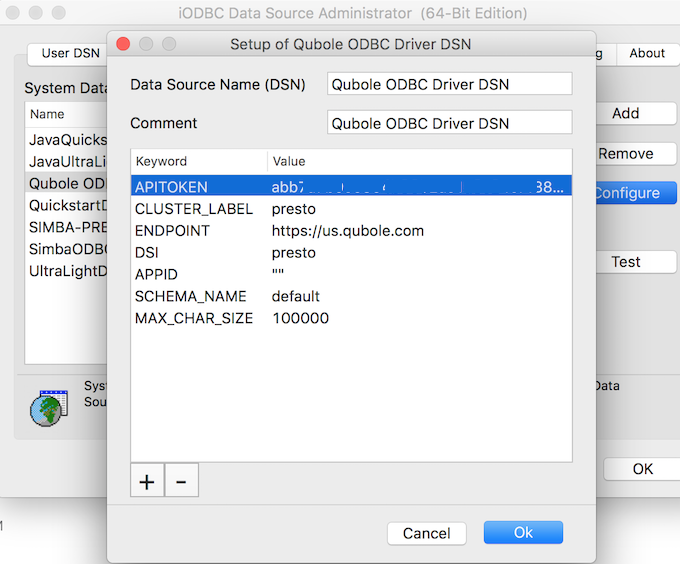
Click Configure and the dialog is illustrated here.
Enter the valid API Token.
Change the DSI to the required one - (Hive, Presto or Spark).
Create a keyword entry by clicking the + button. Add the MAX_CHAR_SIZE keyword and add a value if you do not want to use the default value, which is 100000.
However, some tools require the maximum value to be set below a particular limit.
Example: For Microsoft SQL Server, this value has to be set to 8000 or less than 8000.
Add SCHEMA_NAME as a keyword and enter the schema name as its value, to filter to that schema while fetching metadata so that only the related
TABL_SCHEMconfigured is exposed.Here is the example of the advanced configuration configured on a ODBC driver for Mac.