Understanding the Qubole Cluster Lifecycle
The life cycle of a cluster is best explained by detailing what happens behind the scenes as you and applications interact with QDS during a cluster start, autoscaling, and cluster termination, which are described in these topics:
Cluster Bringup
You can start a cluster in the following ways:
- Start a cluster automatically by running a job or query. For example:
- To run a Hadoop MapReduce job, QDS starts a Hadoop cluster
- To run a Spark application, QDS starts a Spark cluster
- You can start a cluster manually by clicking the Start button on the Cluster page (see Understanding Cluster Operations).
Note
Many Hive commands (metadata operations such as show partitions) do not need a cluster. QDS detects such query operations automatically.
In the Clusters page, against a running cluster, click Resources to see the available list as shown in this figure.
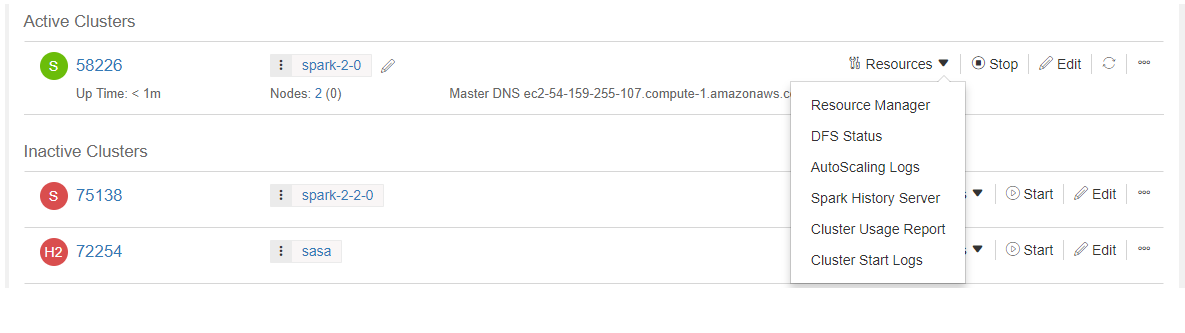
Click Cluster Start Logs to monitor the logs related to a cluster bringup.
You can also see the cluster status through the REST API call to check the cluster state as described in Check Cluster Status.
Cluster Auto-scaling
QDS supports auto-scaling of cluster nodes; see Auto-scaling in Qubole Clusters.
Cluster Termination
Clusters can be manually or automatically terminated as explained below:
- You can terminate a cluster manually from the Cluster tab UI (see Understanding Cluster Operations) or running a cluster termination API call request. You can see the command status and job status in the Usage page to ensure that no command is running before terminating a cluster. For more information, see Command Status and Job Instance Status.
- Qubole keeps a cluster running as long as there are active sessions using the cluster. See Downscaling for more information.
Qubole auto terminates clusters under the following conditions:
- No job, application, or query must be running in the cluster. Once this is true, Qubole waits for a grace period of 5 minutes before considering the cluster a candidate for termination.
- No QDS command must be running on a cluster. You can see the command status and job status in the Usage page. For more information, see Command Status and Job Instance Status.
- No active session must be attached to the cluster. An active session is a user session that has recently run queries against the cluster. An active session stays alive for two hours of inactivity and can run for any amount of time as long as commands are running. Use the Sessions tab in Control Panel to create new sessions, terminate sessions, or extend sessions. For more information, see Managing Sessions.
- For a Spark cluster,
spark.qubole.idle.timeoutis a Spark interpreter property set for the Spark applications’ timeout/termination. The default value ofspark.qubole.idle.timeoutis 60 minutes. Thus, the Spark cluster cannot terminate until the Spark applications terminate.