Introduction to Qubole Clusters
Qubole Data Service (QDS) provides a unified platform for managing different types of compute clusters.
QDS can run queries and programs written with tools such as SQL, MapReduce, Cascading, Pig, Scala, and Python. These run on distributed execution frameworks such as Hadoop, Presto, and Spark, on multi-node clusters comprising one master node and one or more worker nodes.
Note
Not all of these tools and engines are available on all Cloud platforms; see QDS Components: Supported Versions and Cloud Platforms.
Cluster Basics
Each QDS account has:
- Multiple pre-configured clusters and additional clusters that you may create.
- Each cluster is of a different Type corresponding to the execution framework it is configured.
- Each cluster can have one or more unique Labels associated with it. See Cluster Labels for more information.
- A new account is preconfigured with four clusters with one each of the following types:
- Hadoop 1 (labelled as default; currently AWS only)
- Presto (labelled as presto; currently AWS and Azure only)
- Spark (labelled as spark)
- Hadoop 2 (labelled as hadoop2)
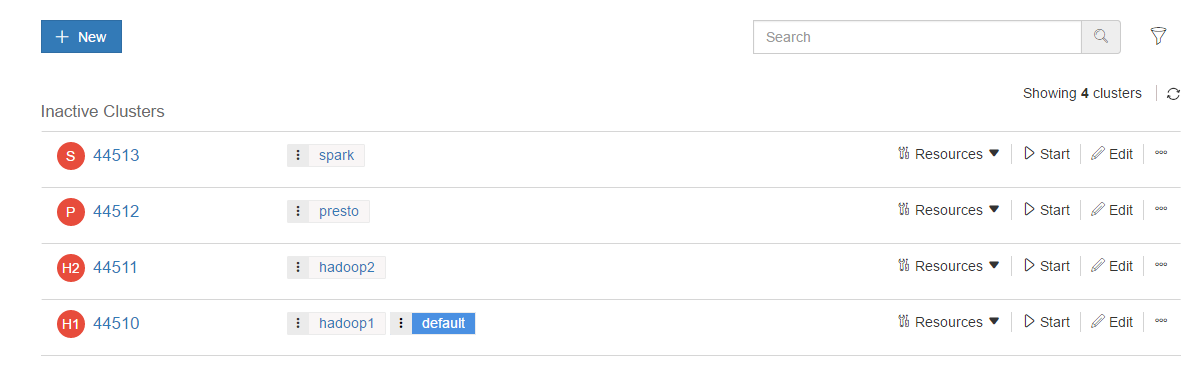
Navigate to Control Panel > Clusters to see the list of clusters. The following image shows the preconfigured clusters for a new account.
Note
The clusters are configured but are not active. The red status icon indicates that a cluster is down.
You can configure several clusters of a single cluster type as needed. (Trial accounts are limited to four clusters.)
Cluster Life Cycle Management
The life cycle of a cluster is best explained by detailing what happens behind the scenes as you and applications interact with QDS. Understanding the Qubole Cluster Lifecycle describes how it is managed.
Cluster Labels and Command Routing
You must assign at least one unique label to each QDS cluster; you can assign more than one label. Each new QDS account has a default Hadoop cluster with the label default.
Qubole commands are routed to clusters using these rules:
If a cluster label is added in a command, the command is routed to the cluster with the corresponding label.
If no cluster label is added in a command, then the command is routed to the first-matching cluster for the given command type. For example:
- Hive, Pig, and Hadoop commands are routed to the first-matched Hadoop cluster.
- Presto commands are routed to the first-matched Presto cluster.
- Spark commands are routed to the first-matched Spark cluster.
Note
Pig and Presto are not supported on all Cloud platforms; see QDS Components: Supported Versions and Cloud Platforms.
Qubole Cluster EC2 Tags (AWS)
For AWS clusters, Qubole instances are tagged with the following three EC2 tags:
- Qubole - This tag’s value is a unique identifier based on the account and cluster. Its value is
qbol-acc<AccountID>_cl<ClusterID>. - alias - This tag identifies the node within the Hadoop cluster. Its value is master or node<number>.
- Name - This tag also identifies the node. Its value is the same as the alias tag. This value can be overridden using a custom EC2 tag.
For information on custom EC2 tags, see Advanced configuration: Modifying EC2 Settings (AWS) (UI) and hadoop_settings (API).