Understanding the Search Experience on Analyze
The filter in the History tab has three fields’ name changed. Whenever you select a cluster label or tag in this filter, selecting a duration (a maximum of 30 days) is mandatory. For more information on the Analyze UI page, see About the Analyze User Interface.
The filter with all fields is as illustrated below.
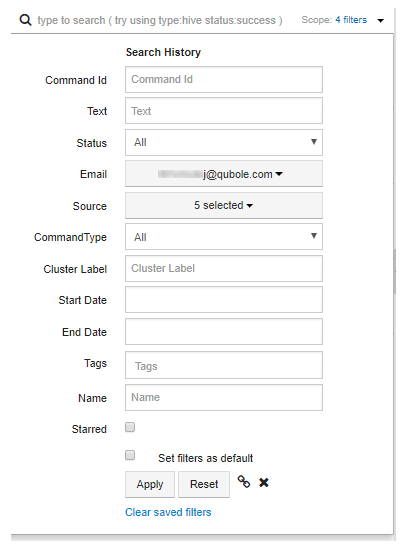
For each word search in the Text field, the Search History displays results in these two different ways:
The default search history that displays search results for the words (specified in the Text field) from the last 100 commands run by the current user. With this default search history, this condition is valid:
The filter in the History tab has Start Date and End Date for filtering between a specific duration. Whenever you select a cluster label or tag in this filter, selecting a duration (a maximum of 30 days) is mandatory.
The search history that searches the words (specified in the Text field) in the last 3 months data and displays such search results. This provides a larger set of results. This feature is not enabled by default. To enable it, create a ticket with Qubole Support.
The following table describes each search field and its supported keywords and values that can be added as search strings
in the search text box that suggests type to search (try using type:hive status:success).
| Search Field | Supported | Supported Keywords | Supported Values | Examples that can be part of Search Strings | |
|---|---|---|---|---|---|
| Command Id | Yes | command_id, id | Full command ID; partial command IDs are not supported. Only one value is supported at a time. | command_id:2024 id:2024 |
|
| Text | Yes | Free form text | Free form text with a blank space and partial tokens are supported. | select from table | |
| Status | Yes | status | All values. Only one value is supported at a time. | status:success, status:failed | |
| Yes | All values | email:user@qubole.com | |||
| Source | Yes | source, interface | All values | source:api, interface:ui | |
| CommandType | Yes | command_type, type
|
Hive | hive, hivequery | command_type:hive, type:hivequery |
| Spark | spark, sparkcommand | command_type:spark, type:sparkcommand | |||
| Presto | presto, prestoquery | command_type:presto, type:prestoquery | |||
| Shell | shell, shellcommand | command_type:shell, type:shellcommand | |||
| Pig | pig, pigquery | command_type:pig, type:pigquery | |||
| Hadoop | hadoop, hadoopjob | command_type:hadoop, type:hadoopjob | |||
| Data Import | dataimport | command_type:dataimport, type:dataimport | |||
| Data Export | dataexport | command_type:dataexport, type:dataexport | |||
| Db Query | dbquery | command_type:dbquery, type:dbquery | |||
| Redshift | redshift, redshiftquery | command_type:redshift, type:redshiftquery | |||
| Query Export | queryexport | command_type:queryexport, type:queryexport | |||
| Workflow | Workflow | command_type:Workflow, type:Workflow | ||||
| Tags | Yes | tags | All values. A comma-separated list of values without a blank space. | tags:database,tables | |
| Cluster label | Yes | cluster_label, cluster | Search by a single cluster label. Only one value is supported at a time. |
cluster:default, cluster:hadoop2, cluster_label:hadoop2 | |
| Start date | Yes | start_date | Date must be in mm/dd/yyyy format. 1 October 2017 must be 10/01/2017 Limited date formats are supported. |
start_date:10/01/2017 | |
| End date | Yes | end_date | Date must be in mm/dd/yyyy format. 15 October 2017 must be 10/15/2017 Limited date formats are supported. |
end_date:10/15/2017 | |
| Name | Yes | name | All values. A comma-separated list of values without a blank space. | name:command1,largeresult | |
| Starred | Yes | starred, favorite, favourite | The commands that are starred. | starred, favorite, favourite | |
Example Search Strings
Here are a few sample search strings that you can type on the text field of the Search History filter.
Look for all failed Hive queries by typing:
type:hive status:failed(OR)command_type:hivequery status:failNote any of the many supported keywords and values can be used to specify command type and command status.
Look for all successful database queries after Oct 1, 2017 by typing:
status:success type:dbquery start_date:10/01/2017Separate different filters using a whitespace character
Look for data updates to table TableA by typing:
insert update tableANote that results displayed include ALL or AND word combinations in the search string in addition to the search string. For example, while searching
insert update tableA, these searches are done and results are combined sequentially:insert tableAinserttableAtableA insert
Look for queries within a specific duration, for example, a month:
insert start_date:09/01/2017 end_date:10/01/2017start_dateandend_datecan be combined to specify the date range or duration.