Presto Query Issues
This topic describes common Presto query issues with solutions and they are:
Handling Memory Issues
When you hit memory issues in Presto queries, as a workaround, perform the following steps:
- Use a bigger cluster by increasing the maximum worker node count.
- Add a limit clause for all subqueries.
- Use a larger cluster instance.
Presto Configuration Properties describes the query execution configuration properties along other settings.
Common Issues and Potential Solutions
Here are some common issues in Presto with potential solutions.
Query exceeded max memory size of <XXXX> GB
This issue appears when memory limit gets exhausted at the cluster level. Set higher value of query.max-memory. This
is a cluster-level limit, which denotes maximum memory that a query can take aggregated across all nodes.
Query exceeded local memory limit of <XXXX> GB
Increase the value of query.max-memory-per-node equal to 40% of worker instance Memory. The query.max-memory-per-node
determines maximum memory that a query can take up on a node
Here are recommendations to avoid memory issues:
- If larger table is on the right side, the chances are that Presto errors out. So, an ideal scenario is put smaller table on the right side and bigger tables on the left side of JOIN.
- The other alternative is use distributed JOINs. By default, Presto supports Map-side JOINs but you can also enable Reduce-side JOINs (distributed JOINs). Rework the query to bring down the memory usage.
No nodes available to run the query
When the master node cannot find node to run the query, one of the common reasons is that cluster is not configured properly. It could be a generic error which might need further triage to find the root cause. Such error message is also seen when no datasource attached for the connector.
Ensure that the connector data source configuration is correct and catalogue properties is defined as below.
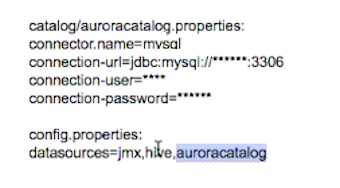
This might also happen due to a configuration error in which worker daemons did not come up or nodes died due to out-of-memory
error. Check server.log in worker nodes.
This can also be seen when the master node is small and it could not do the heartbeat collection.