Troubleshooting Spark Issues
When any Spark job or application fails, you should identify the errors and exceptions that cause the failure. You can access the Spark logs to identify errors and exceptions.
This topic provides information about the errors and exceptions that you might encounter when running Spark jobs or applications. You can resolve these errors and exceptions by following the respective workarounds.
- Out of Memory Exceptions
- Spark job repeatedly fails
- FileAlreadyExistsException in Spark jobs
- Spark Shell Command failure
- Error when the total size of results is greater than the Spark Driver Max Result Size value
- Too Large Frame error
- Spark jobs fail due to compilation failures
You might want to use the Sparklens experimental open service tool that is available on http://sparklens.qubole.net to identify the potential opportunities for optimizations with respect to driver side computations, lack of parallelism, skew, etc. For more information about Sparklens, see the Sparklens blog.
Out of Memory Exceptions
Spark jobs might fail due to out of memory exceptions at the driver or executor end. When troubleshooting the out of memory exceptions, you should understand how much memory and cores the application requires, and these are the essential parameters for optimizing the Spark appication. Based on the resource requirements, you can modify the Spark application parameters to resolve the out of memory exceptions.
For more information about the resource allocation, Spark application parameters, and determining resource requirements, see An Introduction to Apache Spark Optimization in Qubole.
Driver Memory Exceptions
Exception due to Spark driver running out of memory
Description: When the Spark driver runs out of memory, exceptions similar to the following exception occur.
Exception in thread "broadcast-exchange-0" java.lang.OutOfMemoryError: Not enough memory to build and broadcast the table
to all worker nodes. As a workaround, you can either disable broadcast by setting spark.sql.autoBroadcastJoinThreshold to -1
or increase the spark driver memory by setting spark.driver.memory to a higher value
Resolution: Set an appropriate high value for the driver memory by using one of the following commands in Spark Submit Command Line Options on the Analyze page:
--conf spark.driver.memory= <XX>gOR
--driver-memory <XX>G
Job failures due to Application Master that launches the driver exceeds memory limits
Description: Spark job might fail when the Application Master (AM) that launches driver exceeds memory limit and is eventually terminated by Yarn. The following error occurs.
Diagnostics: Container [pid=<XXXXX>,containerID=container_<XXXXXXXXXX>_<XXXX>_<XX>_<XXXXXX>] is running beyond physical memory limits.
Current usage: <XX> GB of <XX> GB physical memory used; <XX> GB of <XX> GB virtual memory used. Killing container
Resolution: Set an appropriate high value for the driver memory by using one of the following commands in Spark Submit Command Line Options on the Analyze page:
--conf spark.driver.memory= <XX>gOR
--driver-memory <XX>G
As a result, a higher value is set for the AM memory limit.
Executor Memory Exceptions
Exception due to executor running out of memory
Description: When the executor runs out of memory, the following exception might occur.
Executor task launch worker for task XXXXXX ERROR Executor: Exception in task XX.X in stage X.X (TID XXXXXX)
java.lang.OutOfMemoryError: GC overhead limit exceeded
Resolution: Set an appropriate high value for the executor memory by using one of the following commands in Spark Submit Command Line Options on the Analyze page:
--conf spark.executor.memory= <XX>gOR
--executor-memory <XX>G
FetchFailedException due to executor running out of memory
Description: When the executor runs out of memory, the following exception might occur.
ShuffleMapStage XX (sql at SqlWrapper.scala:XX) failed in X.XXX s due to org.apache.spark.shuffle.FetchFailedException:
failed to allocate XXXXX byte(s) of direct memory (used: XXXXX, max: XXXXX)
Resolution: From the Analyze page, perform the following steps in Spark Submit Command Line Options:
Set an appropriate high value for the executor memory by using one of the following commands:
--conf spark.executor.memory= <XX>gOR
--executor-memory <XX>G
Increase the number of shuffle partitions by using the following command:
--spark.sql.shuffle.partitions
Executor container killed by YARN for exceeding memory limits
Description: When the container hosting the executor needs more memory for overhead tasks or executor tasks, the following error occurs.
org.apache.spark.SparkException: Job aborted due to stage failure: Task X in stage X.X failed X times,
most recent failure: Lost task X.X in stage X.X (TID XX, XX.XX.X.XXX, executor X): ExecutorLostFailure
(executor X exited caused by one of the running tasks) Reason: Container killed by YARN for exceeding memory limits. XX.X GB
of XX.X GB physical memory used. Consider boosting spark.yarn.executor.memoryOverhead
Resolution: Set a higher value for
spark.yarn.executor.memoryOverheadbased on the requirements of the job. The executor memory overhead value increases with the executor size (approximately by 6-10%). As a best practice, modify the executor memory value accordingly.Set an appropriate high value for the executor memory overhead by using the following command in Spark Submit Command Line Options on the Analyze page:
--conf spark.yarn.executor.memoryOverhead=XXXXNote
For Spark 2.3 and later versions, use the new parameter
spark.executor.memoryOverheadinstead ofspark.yarn.executor.memoryOverhead.If increasing the executor memory overhead value or executor memory value does not resolve the issue, you can either use a larger instance or reduce the number of cores by using the following command in Spark Submit Command Line Options on the Analyze page:
--executor-cores=XX. Reducing number of cores might lead to memory wastage but the job is executed.
Spark job repeatedly fails
- Description: When the cluster is fully scaled and the cluster is not able to manage the job size, spark job might fail repeatedly.
- Resolution: Run the Sparklens tool to analyze the job execution and optimize the configuration accordingly. For more information about Sparklens, see the Sparklens blog.
FileAlreadyExistsException in Spark jobs
Description: The FileAlreadyExistsException error occurs in the following scenarios:
Failure of the previous task might leave some files that trigger the FileAlreadyExistsException errors as shown below.
org.apache.spark.SparkException: Task failed while writing rows
at org.apache.spark.sql.execution.datasources.FileFormatWriter$.org$apache$spark$sql$execution$datasources$FileFormatWriter$$executeTask(FileFormatWriter.scala:272)
at org.apache.spark.sql.execution.datasources.FileFormatWriter$$anonfun$write$1$$anonfun$apply$mcV$sp$1.apply(FileFormatWriter.scala:191)
at org.apache.spark.sql.execution.datasources.FileFormatWriter$$anonfun$write$1$$anonfun$apply$mcV$sp$1.apply(FileFormatWriter.scala:190)
at org.apache.spark.scheduler.ResultTask.runTask(ResultTask.scala:87)
at org.apache.spark.scheduler.Task.run(Task.scala:108)
at org.apache.spark.executor.Executor$TaskRunner.run(Executor.scala:335)
at java.util.concurrent.ThreadPoolExecutor.runWorker(ThreadPoolExecutor.java:1142)
at java.util.concurrent.ThreadPoolExecutor$Worker.run(ThreadPoolExecutor.java:617)
... 1 more
Caused by: org.apache.hadoop.fs.FileAlreadyExistsException: s3://xxxxxx/xxxxxxx/xxxxxx/analysis-results/datasets/model=361/dataset=encoded_unified/dataset_version=vvvvv.snappy.parquet already exists
at org.apache.hadoop.fs.s3a.S3AFileSystem.create(S3AFileSystem.java:806)
at org.apache.hadoop.fs.FileSystem.create(FileSystem.java:914)
When the executor runs out of memory, the individual tasks of that executor are scheduled on another executor. As a result, the FileAlreadyExistsException error occurs.
When any Spark executor fails, Spark retries to start the task, which might result into FileAlreadyExistsException error after the maximum number of retries.
A sample original executor failure reason is shown below.
Caused by: org.apache.spark.SparkException: Job aborted due to stage failure: Task 1 in stage 2.0 failed 3 times,
most recent failure: Lost task 1.3 in stage 2.0 (TID 7, ip-192-168-1- 1.ec2.internal, executor 4): ExecutorLostFailure
(executor 3 exited caused by one of the running tasks) Reason: Container killed by YARN for exceeding memory limits.
14.3 GB of 14 GB physical memory used. Consider boosting spark.yarn.executor.memoryOverhead
Note
In case of DirectFileOutputCommitter (DFOC) with Spark, if a task fails after writing files partially, the subsequent reattempts might fail with FileAlreadyExistsException (because of the partial files that are left behind). Therefore, the job fails. Set the
spark.hadoop.mapreduce.output.textoutputformat.overwriteandspark.qubole.outputformat.overwriteFileInWriteflags to true to prevent such job failures.
Resolution:
- Identify the original executor failure reason that causes the FileAlreadyExistsException error.
- Verify size of the nodes in the clusters.
- Upgrade them to the next tier to increase the Spark executor’s memory overhead.
Spark Shell Command failure
Description: When a spark application is submitted through shell command on QDS, it might fail with the following error.
Qubole > Shell Command failed, exit code unknown
2018-08-02 12:43:18,031 WARNING shellcli.py:265 - run - Application failed or got killed
In this case, the actual reason that kills the application is hidden and you might not able to find the reason on the logs directly.
Resolution:
- Navigate to the Analyze page
- Click on the Resources tab to analyze the errors and perform the appropriate action.
- Run the job again by using the Spark Submit Command Line Options on the Analyze page.
Error when the total size of results is greater than the Spark Driver Max Result Size value
Description: When the total size of results is greater than the Spark Driver Max Result Size value, the following error occurs.
org.apache.spark.SparkException: Job aborted due to stage failure: Total size of serialized results of x tasks (y MB) is bigger
than spark.driver.maxResultSize (z MB)
Resolution: Increase the Spark Drive Max Result Size value by modifying the
--conf spark.driver.maxResultSizevalue in Spark Submit Command Line Options on the Analyze page.
Too Large Frame error
Description: When the size of the shuffle data blocks exceeds the limit of 2 GB, which spark can handle, the following error occurs.
org.apache.spark.shuffle.FetchFailedException: Too large frame: XXXXXXXXXX
at org.apache.spark.storage.ShuffleBlockFetcherIterator.throwFetchFailedException(ShuffleBlockFetcherIterator.scala:513)
at org.apache.spark.storage.ShuffleBlockFetcherIterator.next(ShuffleBlockFetcherIterator.scala:444)


Caused by: java.lang.IllegalArgumentException: Too large frame: XXXXXXXXXX
at org.spark_project.guava.base.Preconditions.checkArgument(Preconditions.java:119)
at org.apache.spark.network.util.TransportFrameDecoder.decodeNext(TransportFrameDecoder.java:133)
Resolution: Perform one of the following steps to resolve this error:
Solution 1:
- Run the job on Spark 2.2 or higher version because Spark 2.2 or higher handles this issue in a better way when compared to other lower versions of Spark. For information, see https://issues.apache.org/jira/browse/SPARK-19659.
- Use the following Spark configuration:
- Modify the value of
spark.sql.shuffle.partitionsfrom default 200 to a value greater than 2001. - Set the
spark.default.parallelismvalue as same as thespark.sql.shuffle.partitionsvalue.
- Modify the value of
Solution 2:
- Identify the DataFrame that is causing the issue.
- Add a spark action(for instance, df.count()) after creating a new DataFrame.
- Print anything to check the DataFrame.
- If the print statement is not executed for a DataFrame, then the issue is with that DataFrame.
- After the DataFrame is identified, repartition the DataFrame by using
df.repartition()and then cache it by usingdf.cache(). - If there is skewness in the data and you are using Spark version earlier than 2.2, then modify the code.
Spark jobs fail due to compilation failures
When you run a Spark program or application from the Analyze page, the code is compiled and then submitted for the execution. If there are syntax errors, or the jars or classes are missing, then the jobs might fail during compilation or runtime.
Description: If there are any errors in the syntax then the job might fail even before the job is submitted because of compile issues.
The following figure shows a syntax error in a Spark program written in Scala.

Resolution: Check the code for any syntax errors and rectify the syntax. Rerun the program.
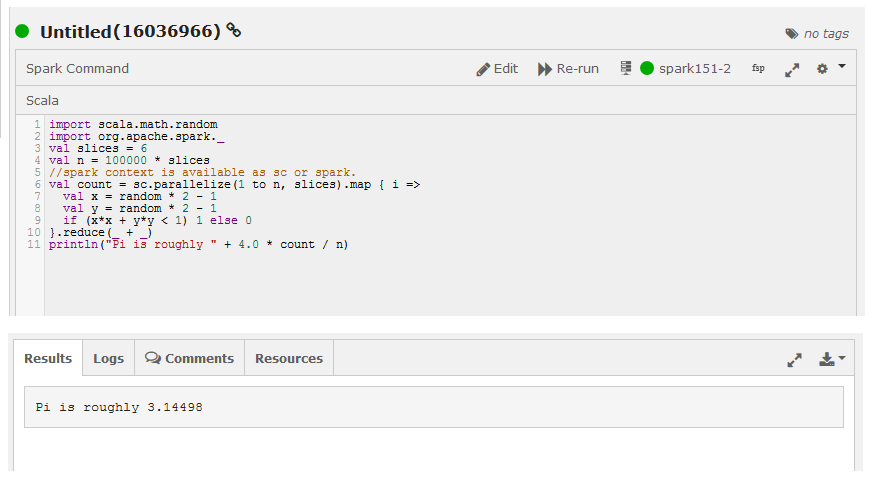
The following figure shows a Spark job that ran successfully and displayed results.
Description: class/jar not found error occurs when a Spark program that you run uses a functionality in a jar that is not available in the Spark program’s classpath. When the program is compiled if the class/jar is not found then the error occurs during the compilation time. When the program is compiled locally and then submitted for execution, then the missing class/jar results into runtime error.
The following figure shows examples of class not found error.

Resolution: Add the dependent classes and jars and rerun the program. See Specifying Dependent Jars for Spark Jobs